Examples
Examples are finished workspaces. Where a tutorial walks you through building something step by step, an example hands you the completed result so you can open it, run it, and take the parts you need.
They are the fastest way to answer questions like "what would CrossModel generate for Snowflake?" or "how do I turn my mappings into dbt models?" - without doing a tutorial first.
Cloning an example
Every example lives on its own branch of the public crossmodel-examples repository, and the CrossModel welcome page can clone it for you:
- Open the welcome page (Help → Welcome if you have closed it).
- In Tutorials & Examples, choose
examplesin the first dropdown. - Work through the remaining dropdowns to the example you want.
- Press Clone, select your
workspacefolder and press Select as Repository Destination. The picker opens one level above your workspace, so the default folder is next to it rather than inside it. - When CrossModel asks whether to open the cloned repository or add it to the current workspace, press Close - it is already in your workspace.
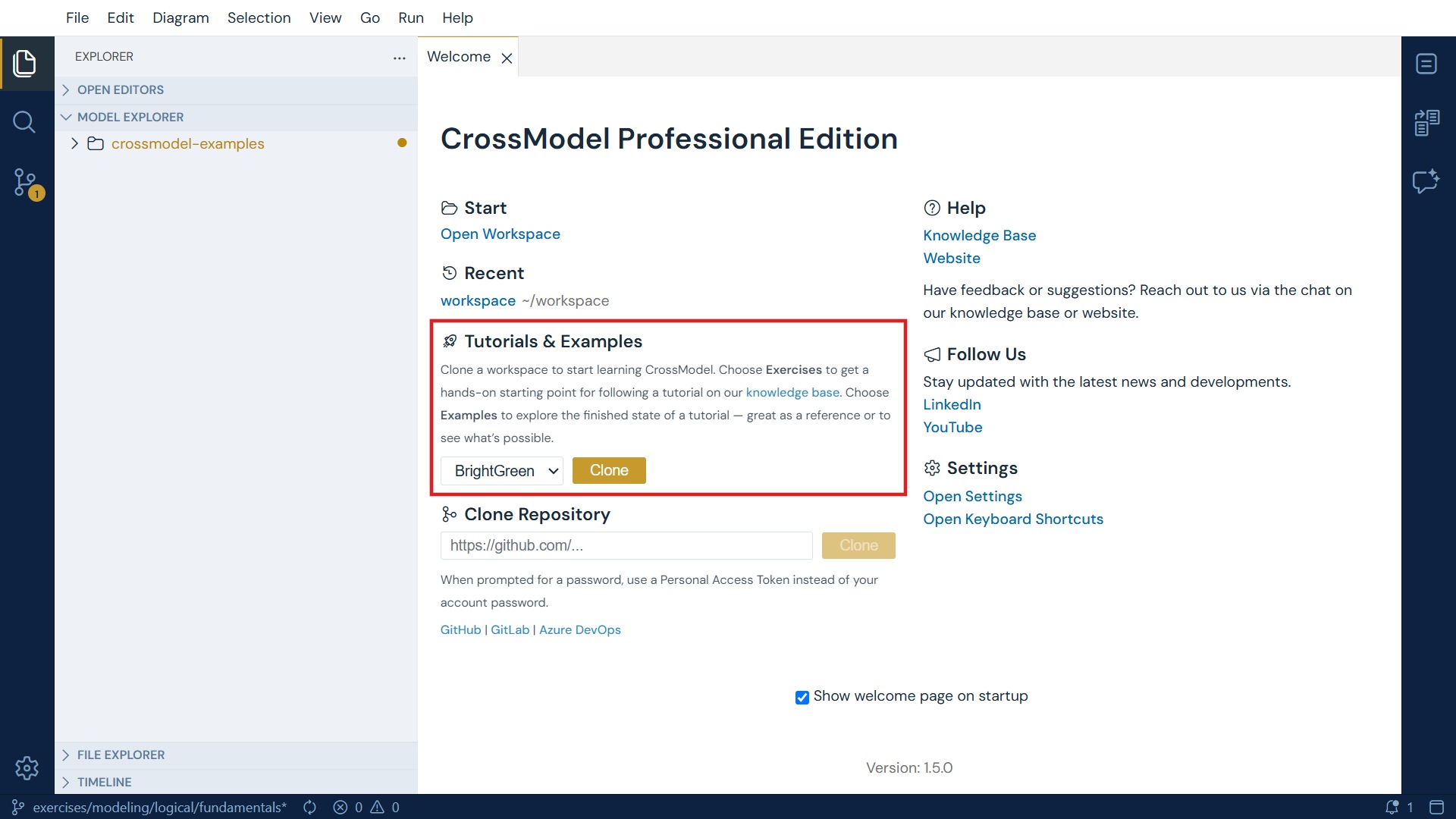
See Getting the workspace for a tutorial for how the dropdowns map onto branch names.
They all share one data model
Every example builds on BrightGreen, the same fictional electronics retailer used
throughout the tutorials - three source systems (JuiceERP, OptimalERP and
PreciseFinance) feeding a data warehouse (Example DWH) and a data mart
(Example DataMart), with shared type definitions in Definitions. Once you know that
landscape you can move between examples without re-orienting yourself each time.
Modeling and mapping examples
These are the finished workspaces from the tutorials, written up on their own terms: what the model contains, what it demonstrates, and what is worth looking at. Read them to understand a technique without working through the steps.
| Example | What it shows | Result of |
|---|---|---|
| A logical data model built from scratch | Entities, identifiers and relationships in a hand-built model | Datamodeling Fundamentals |
| A conceptual model linked to a logical one | A conceptual tier, and how a logical entity records which concept it realizes | Conceptual Modeling |
| A data model reverse engineered from DDL | What the AI assistants produce from a SQL schema and its documentation | Use the AI Assistants |
| A basic source-to-target mapping | Attribute-level lineage in its simplest form | Mapping Fundamentals |
| A mapping with a transformation expression | How transformation logic is recorded without losing lineage | Add Expressions to a Mapping |
| A mapping that joins two sources | Joins, dependencies and conditions across systems | Creating a Mapping with Multiple Sources |
Code generation examples
These examples all use CrossGenerate to turn the BrightGreen models into working output. They differ in what they produce.
| Example | What it generates | Generated from |
|---|---|---|
| Generating staging tables | CREATE TABLE DDL for a staging layer |
Entities |
| Generating data warehouse views | CREATE OR REPLACE VIEW statements that implement your mappings |
Mappings |
| Generating documentation | Markdown documentation of a whole data model | Data models |
| Generating dbt models | A complete dbt project you can run on DuckDB | Entities and mappings |
| Generating Snowflake SQL | Snowflake tables, transformations and load procedures | Entities and mappings |
Which one should I look at?
- New to CrossGenerate? Start with generating staging tables. It is the smallest example - one template, one entity, readable output.
- Want to see the full picture? Generating data warehouse views adds mappings on top of staging, which is where CrossModel's lineage starts paying off.
- Heading for a specific platform? Go straight to dbt or Snowflake. Both show a complete pipeline from model to running warehouse.
- Need to hand models to people who don't use CrossModel? Generating documentation produces browsable markdown.
Handlebars or Nunjucks?
Several examples exist in both a handlebars and a nunjucks variant. The generated output
is the same - only the template language differs. Nunjucks has the richer feature set and is
used by the larger examples; Handlebars is simpler. See
Code Generation for the difference.
Before you start with code generation
You will get more out of the code generation examples if you have read Code Generation first - it explains the CrossGenerate panel, template scopes, and how the output filename pattern works. Each example assumes you can open CrossGenerate and run a template.
Examples and tutorials are different things
Both are listed by topic, so it is worth being clear about which you want:
| Tutorials | Examples | |
|---|---|---|
| Shape | Step-by-step instructions | An explanation of a finished workspace |
| You end up with | Something you built | Something you can read and take from |
| Clone | BrightGreen or a tutorials/… branch |
An examples/… branch |
Where a tutorial exists, its finished workspace is also an example - the two are linked in both directions, so you can switch between doing and reading at any point.