Git Provider Authentication
Connecting CrossModel to a Git Repository
CrossModel supports connecting workspaces to remote Git repositories, allowing you to version control your data models and collaborate with your team. This article explains how authentication works with the supported Git providers: GitHub and Azure DevOps.
Cloning a Repository
When you clone a Git repository from within CrossModel, you will be prompted to enter credentials. The exact prompt depends on the Git provider:
| Git Provider | Prompted for |
|---|---|
| GitHub | Username and password (PAT) |
| Azure DevOps | Password (PAT) only |
In both cases, the password field expects a Personal Access Token (PAT) - not your regular account password.
Personal Access Tokens (PAT)
A Personal Access Token is a secure alternative to a password that grants access to a Git repository. Each provider has its own way of generating PATs.
GitHub
For GitHub, it is recommended to use a fine-grained personal access token. Fine-grained tokens allow you to scope permissions specifically to the repository you need, limiting potential exposure if the token is ever compromised.
To create a fine-grained token in GitHub:
- Go to Settings > Developer settings > Personal access tokens > Fine-grained tokens
- Click Generate new token
- Set the Resource owner and select the specific repository
- Grant the minimum required permissions (e.g. read/write access to Contents)
- Copy the generated token and use it as the password when prompted in CrossModel
Azure DevOps
For Azure DevOps, generate a PAT from your User Settings in the Azure DevOps portal. When prompted by CrossModel, enter the PAT in the password field (no username is required).
How CrossModel Stores Credentials
Default behavior - in-memory cache
By default, CrossModel stores your PAT in memory for the duration of your session. The credential cache expires after 1 hour. Once the cache expires, CrossModel will prompt you to re-enter the PAT the next time it needs to authenticate with the remote repository.
This is the default behavior because it avoids persisting sensitive tokens to disk.
Persisting credentials in the workspace
If you prefer not to re-enter your PAT after every hour, you can instruct Git to store the credential locally within your workspace. For this you need to open the .gitconfig file and change the credential helper setting. Go to File -> Open, check Show hidden files and navigate up untill you see the .gitconfig file:
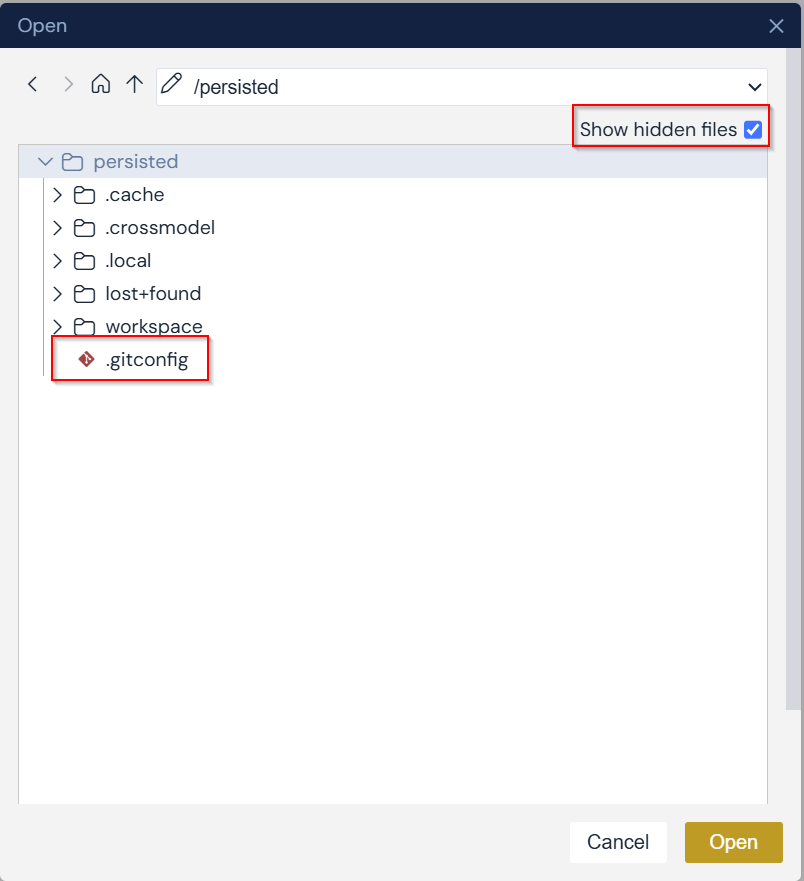
In the file change the following line:
[credential]
    helper = cache --timeout=3600
to:
[credential]
    helper = store
Then save and close the file.
With this setting, Git will write your PAT to a plain text file in the workspace storage. The credential persists across session stops and starts - you will not need to re-enter the PAT until it expires or is revoked.
Security consideration
The credential.helper store option saves your PAT in plain text on the workspace filesystem. This is why it is not enabled by default. It is a user preference and an acceptable setup when using fine-grained PATs with limited repository scope, but be aware that anyone with access to the workspace storage can read the token.
Configuring your name and email address
Git records a name and email on every commit. In a CrossModel Cloud workspace you do not have to set these up: at the start of each session your identity is taken from your CrossModel account and written into the workspace's global git configuration, so commits are attributed to you from the first one.
You only need the rest of this section if you want to commit under a different name or email, for example a work address on a client repository. A value you set yourself is left alone at the next session start, so an override you make here persists.
To override it, add the following lines - with your actual name and email address instead of the placeholders - to the appropriate config file. See the table below to determine which file to adjust. Be sure to check "show hidden files" in the file open dialog, since the config files are hidden by default.
[user]
    name = Your name
    email = Your emailaddress
| Configuration type | explanation | config file to adjust |
|---|---|---|
| global | applies to all git repositories used in this workspace | the .gitconfig file found in the persisted folder |
| local | applies only to the current git repository | the config file found in the .git folder in the repository root |
Summary
| Scenario | Behavior |
|---|---|
| Default (no configuration) | PAT cached in memory, expires after 1 hours |
credential.helper store enabled |
PAT stored in plain text in workspace, persists across sessions |
| Fine-grained PAT (GitHub) | Recommended - limits token scope to specific repo and permissions |