CrossModel User Interface
Understanding the main components of the CrossModel User Interface
CrossModel is built on the Eclipse Theia IDE, a VS Code compatible IDE that is extensible from the Open VSX registry. Users familiar with VS Code will quickly find their way in the CrossModel user interface.
When opening a CrossModel workspace for the first time the following screen is displayed:
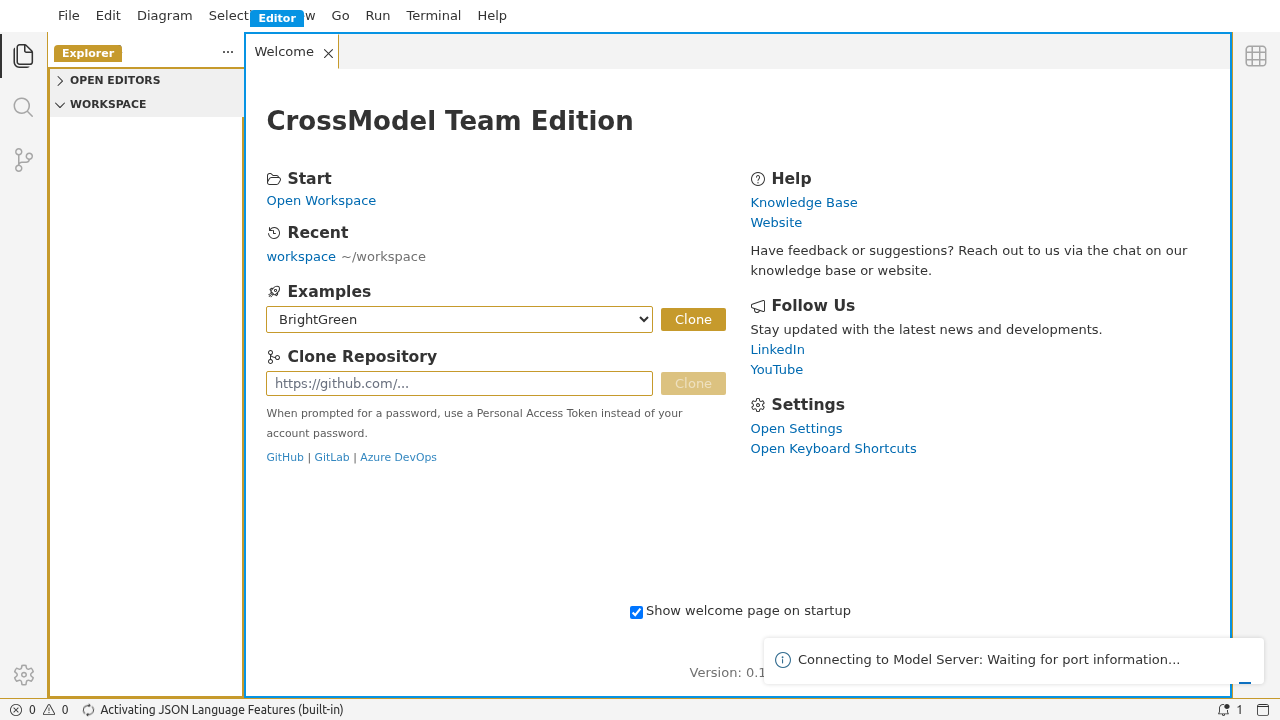
In the left-most panel, the following icons are found:
| Icon | Explanation |
|---|---|
 |
Displays the (file) explorer panel, allowing you to navigate through models in the workspace. |
 |
Displays the search panel, allowing you to search for files with specific names or content in your entire workspace folder. |
 |
Displays version control panel, allowing you to work with models from a Git repository. |
 |
Displays extension panel. Here you can install, remove and manage extensions to extend capabilities of CrossModel. |
 |
Access CrossModel settings. |
Next to the panel that displays the Explorer, Search, Version control or Extensions, is the main panel, this shows the selected model item, for example the model settings, an entity or diagram.
The panel on the right is the property panel, this shows information from the currently selected model item.
This button on the right can be used to show or hide the property panel.
The bottom panel named problems will give warnings and errors when a model is in an invalid state.